PR 353: Implement AI Agent installation
Run 3, at 60a4ab58, process B, every point repeated on the running build. Nothing is posted.
Suggested verdict: Request changes
The three replies of the last round hold up. What still breaks for a user: 1 (an installed agent shown as missing after two clicks, and it can cost the chats) and 2 (no reply, and the settings page does it by itself). With those two done it is an approve; 6 and 7 would not hold it.
- After Extensions, an installed agent shows as not installed: blocker, new
- False "llm-secret has been removed": should fix, open thread
- Lost chats: addressed, resolve
- Announcements: addressed, resolve
- Pod that only waits: answered, resolve
- Panel moves in a low window: optional
- Agent without a Helm release: optional
See what the PR builds in the guide, or the comments in the guide. Log in as admin of mf-rancher-16.
An installed agent shows as not installed after a visit to Extensions
Leaving Extensions makes the dashboard forget the Apps. The flag that they were loaded stays on, so the empty list reads as "no agent". The chat offers to install it and the settings say "not ready yet", until a reload. The agent is deployed and 1/1 the whole time.
- How often: 4 of 4 on the preview. Control: Settings, Users and Charts, 0 of 3. A reload repairs it. The other pass also got it on the real Prime dashboard, 8 of 8.
- Following the panel: step 3 on the running agent, no lost-messages line in the dialog, and the chat was gone after Apply: 1 before, 0 after (1 of 1).
- During an install: step 1 fails with "The Helm repository rancher-ai has been removed" while it exists, 2 of 2.
- Versions: the Extensions page does this in release-2.13 to 2.16 and master (read in the code; run on the 2.16 preview).
- Steps: agent installed, open the chat, click Extensions in the side bar, click Home.
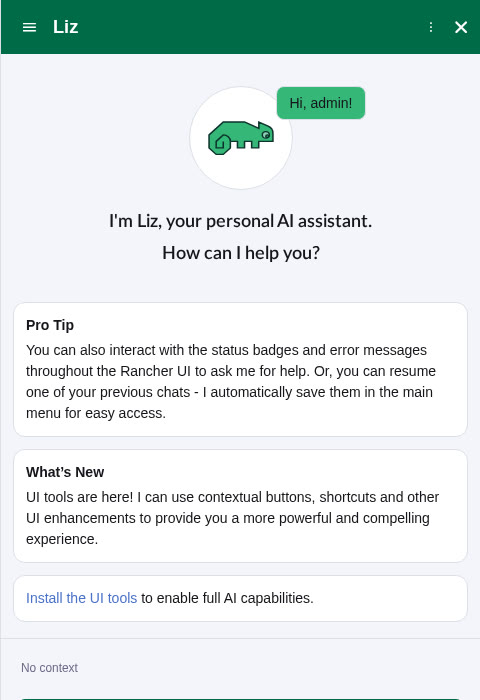
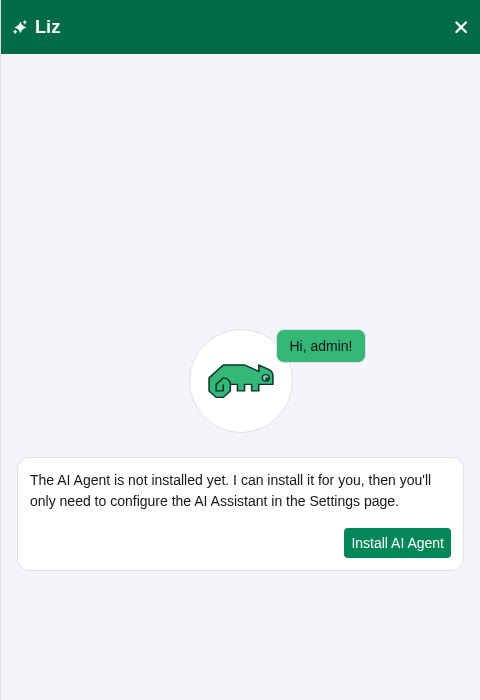
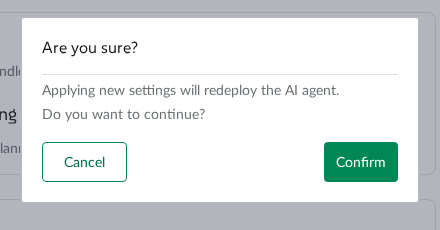
In the guide: after Extensions, following the panel, live, during an install
To post: new inline comment
After a visit to the Extensions page, an installed agent shows as not installed: leaving that page makes the dashboard forget the Apps, so this reads an empty list. The chat then offers to install it and the settings say "not ready yet" until a reload, and when I followed the panel, Apply did not warn about lost messages and my chat was gone. During an install the same thing fails step 1 with "The Helm repository rancher-ai has been removed". I missed this one in my first reviews, sorry.
"llm-secret has been removed" when it was not
No reply yet, and none of the three commits touches it. The secret had the same uid every time.
- Cluster Management > Repositories > Create at step 3: 2 of 2. Retry Install then replaced the running deployment and the secret, 2 of 2.
- The settings page itself: at step 3, add an agent and choose Basic authentication: 2 of 2. The form is replaced by "not ready yet" and what was typed is gone.
- CI: e2e is green, but two tests of chat-ai-agent-install.spec failed 3 of their 5 attempts. The other pass tied them to this by delaying Prime's own secrets list (2 of 2); green runs keep no screenshots, so I have not seen the CI ones.
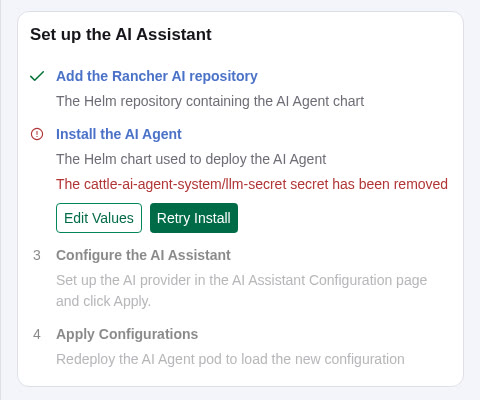
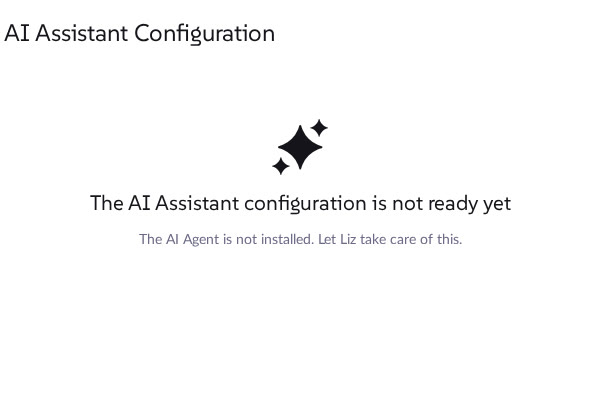
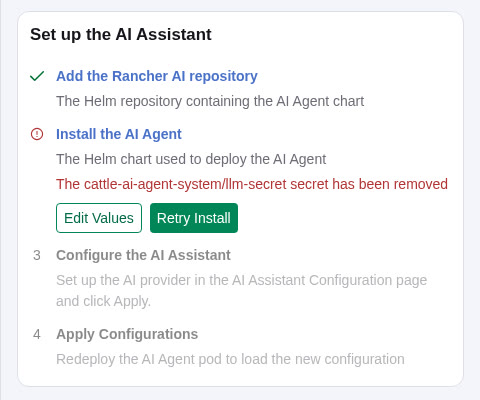
In the guide: Repositories, Create, the settings page
To post: reply in the thread
This one is still there, and the settings page does it too: at step 3, adding an agent and choosing Basic authentication fails step 2, and the form is replaced by "The AI Assistant configuration is not ready yet", so what I typed is lost. Two tests of chat-ai-agent-install.spec also needed retries in this e2e run.
Lost chats: the warning shows now
torchiaf said
Ah this is a code issue, this is a ref but it should be computed […] Fixed, thanks
2 of 2 whole installs: no warning during the install, and the warning on the same page after Start chatting, as after a reload.
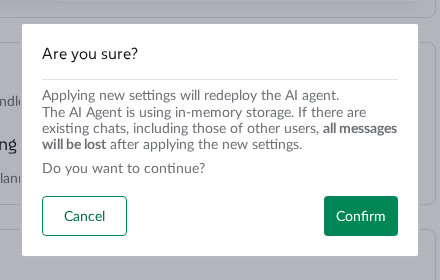
In the guide: the dialog
To post: reply, then resolve
Confirmed, thanks: the warning shows on the same page once the install ends.
Announcements: each step is read
torchiaf said
Ok, let's change strategy, I added a sr-only div that watchers the process
The region is in the panel and empty before the first step. Start, completed and failed are each put in it once, with the error text. Read from the page, not with a screen reader.
In the guide: live
To post: reply, then resolve
Works, thanks: each step is announced when it starts, completes or fails.
A pod that only waits: Retry Install
torchiaf said
Let's keep it simple […] I would simply rename the button to "Retry Install" when the step fails. We don't want to handle all possible errors from the install panel.
The panel still says "cannot be scheduled" 40 s after the agent is 1/1. Retry Install uninstalls and installs again and completes (1 of 1). At step 2 nothing is configured, so nothing is lost: a decision I can accept.
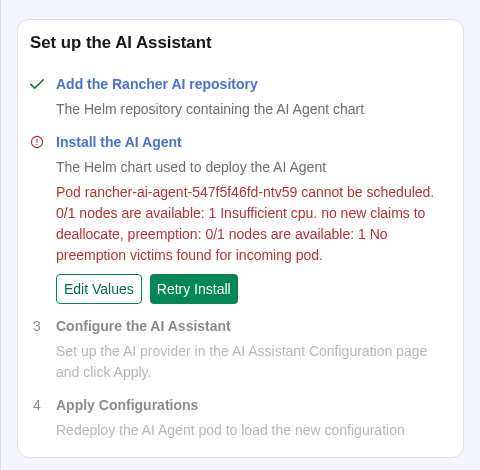
In the guide: the panel
To post: reply, then resolve
Fair, fine with me. Retry Install worked once the pod could be scheduled.
The panel moves up in a low window
With the hidden texts, Tab past Install moves the whole panel: 71 px at 960x470, 121 px at 1440x420, so the header and the close button leave the view. 0 at 1280x560, 1280x577 and 1440x900, and 0 at every size with those texts hidden another way. The other pass also got it at 1280x577 with a failed step 2.
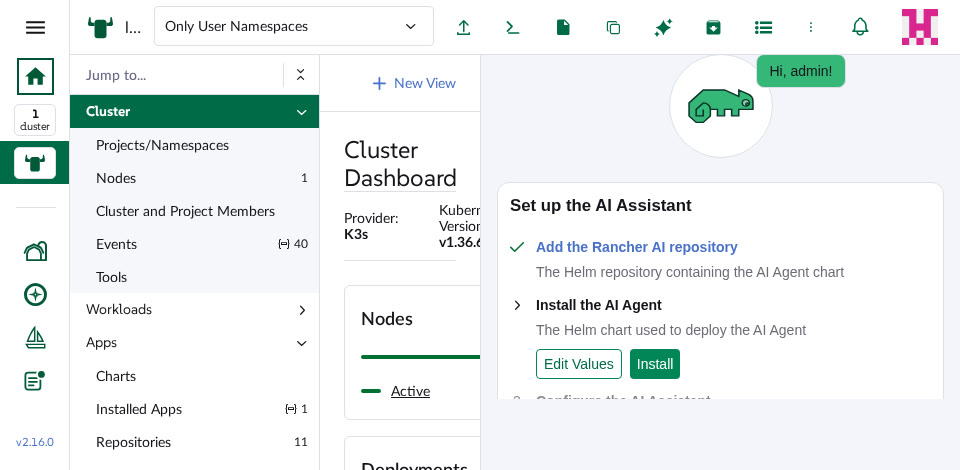
In the guide: the picture
To post: optional inline comment
Small one: in a low window (960x470, or 200% zoom) tabbing past Install moves the whole panel up, and the Liz header and its close button go out of view. It does not happen without the hidden texts.
An agent without a Helm release
With the chart applied as plain manifests (simulated by deleting the release secret), an admin always gets the install panel. After all four steps, Start chatting brings it back (1 of 1). On main the chat looks at the deployment only.
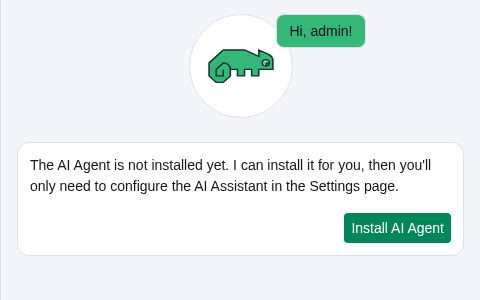
In the guide: the picture
To post: optional inline comment
An agent that runs without a Helm release (applied as plain manifests, for example) always shows the install panel to admins, also after all four steps. On main it works with the deployment alone.
The lost chats warning and the announcements work now, and I am fine with Retry Install. Two things left: the false "llm-secret has been removed", and an installed agent that shows as not installed after a visit to Extensions, which I missed before.
2cccd213hasChats is computed.a6153273Retry Install.60a4ab58a status text for screen readers, and no name on the list items any more. 66 lines added, 10 removed.- The seven resolved threads: the other pass spot-checked them, no regression.
- Unit tests of the touched files: 142 pass, 2 skipped. CI at 60a4ab58: lint, i18n, unit and e2e green, e2e with retries (two tests of the new spec; the other retried tests also retry on other branches).
- Whole flow with Edit Values, Apply, Start chatting and a mock answer, 2 of 2.
- A real screen reader, an autoscaled cluster, Argo CD itself, Rancher 2.13 to 2.15 live. The Extensions point on the real Prime dashboard is the other pass's run.
- mf-rancher-16: agent not installed,
llm-mockin its namespace, and therancher-airepository left on purpose for the guide (its step 1 finds it and creates nothing). Undo:kubectl delete clusterrepo rancher-ai.